Kako dodati poddomen na hosting nalog

Kako dodati poddomen na hosting nalog

Dakle, ulogovali ste se na myVesta hosting panel (username i password smo vam poslali emailom).
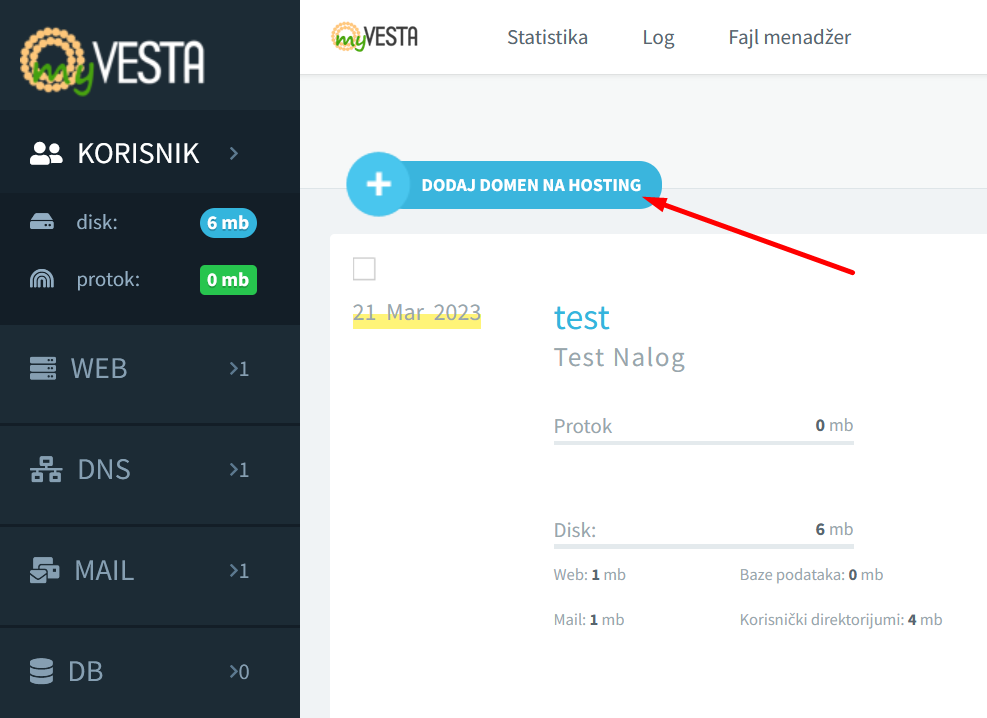
 

Videćete plavi plusić ‘DODAJ DOMEN NA HOSTING‘, kliknite ga.


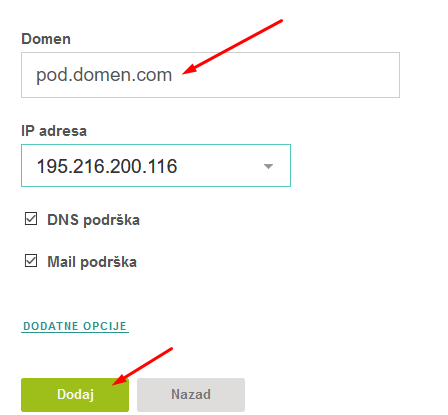
Unesite adresu poddomena koji dodajete na hosting (recimo da dodajete pod.domen.com), i zatim kliknite na zeleno ‘Dodaj‘ dugme.
 

Pisaće vam gore ‘Domen pod.domen.com je uspešno dodat.’


Time smo kreirali poddomen na vaš hosting, i sada se možete ulogovati preko FTP-a i uploadovati fajlove na poddomen.

Logo_Hetzner.svg
php-logo-bigger
MySQL_textlogo.svg
logo-4
logo-5

Vaša online priča počinje ovde

Brz, siguran i pouzdan hosting za svaki projekat

MyCity Hosting
Privacy Overview

This website uses cookies so that we can provide you with the best user experience possible. Cookie information is stored in your browser and performs functions such as recognising you when you return to our website and helping our team to understand which sections of the website you find most interesting and useful.